how do I study
Honestly, I'm not a person who enjoys studying, but it's inevitably an activity we have to do. So, I always look for the best methods that achieve greater learning in less time, without sacrificing the quality of learning.
The tool I've used most in my studies is Obsidian. It allows me to connect notes forming a network of notes, the famous Zettelkasten method, or a variation thereof.
I've seen a lot of videos about it, but I think the main one and the one that helped me the most was the one on the Paiva channel.

Organization
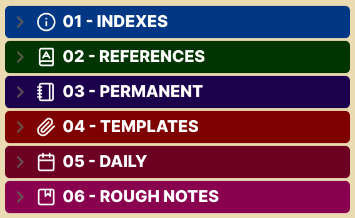
basically I divide my notes like this:
Indexes
This folder serves as a starting point for all the great content I'll be covering. For example, if I want to learn about cybersecurity, there will be an index called 01 - Cybersecurity.
It serves solely to facilitate navigation between themes.
References
All the material I use that wasn't made by me, from links to videos and PDFs. This makes it easier later if I want to return to that topic.
Permanent
It is within this folder that my notes themselves are kept. Within it there is a folder for each index and within each of these folders there is a file called _CRONOGRAMA, where I organize the subtopics of this large content.
Templates
It serves to standardize and speed up my writing and organization process.
Daily
They are daily goals, it makes it easier if I want to see what I studied during the day.
Rough notes
These are literally my preliminary notes. Before moving to the permanent folder, the content passes through here. It's also useful for quick notes and thoughts.
But how do you create notes?
This is the most important part of improving your learning. Writing good notes is essential for retaining an idea and content, which tends to be extensive and complex. What I do, and what I think has worked well for me, is to break everything down into small notes. Obsidian's note linking feature allows me to create a true network of notes. An example:
Javascript async
I will link this content to what I write about:
- Promise
- Async/await
- Event loop
- Callback
each with its own definition, examples and your own related notes.
Conclusion
Studying isn't always about motivation, it's about creating a system that works for you. By breaking content into smaller, interconnected pieces and using tools like Obsidian, I've been able to study more efficiently, with better retention and less stress.